All-in-one Workforce Management Software Solution for Healthcare: Features, Benefits & Buying Guide
A missed shift is rarely just a scheduling problem. In a hospital, clinic or care home, it can mean unexpected overtime, urgent staffing calls and extra pressure on the people already working. When employee schedules, attendance records and team updates sit in different systems, managers lose time reconciling information instead of solving the problem.
All-in-one workforce management software solution for healthcare, brings those processes into a more consistent workflow. Depending on the platform, it can connect shift scheduling, time and attendance, absence tracking, reporting, training records and workforce communication. The key is knowing which capabilities your organization needs and which ones a vendor can actually deliver.
This guide covers the essential features, measurable benefits, software costs, selection criteria and implementation steps, along with where StaffViz may fit for healthcare operations teams.

What Is Healthcare Workforce Management Software Solution?
Healthcare workforce management software helps healthcare organizations plan, record and analyze staff work across shifts, departments and locations. A basic platform may handle employee time tracking and attendance. More specialized solutions may also manage clinical rosters, skill-based assignments, staffing rules, and integrations with hospital systems.
The term “all-in-one” should mean that the workflows you rely on are connected. It does not automatically mean every product includes nurse-to-patient staffing rules, license validation, electronic health record (EHR) integration, or healthcare-specific compliance functions.
Why Healthcare Workforce Management Is More Complex
Healthcare teams work through nights, weekends, and emergencies. Unlike many office environments, availability alone may not make someone suitable for a shift. Managers may also need to consider qualifications, workload, local labor rules, and continuity of care.
- 24/7 staffing coverage: plan for nights, holidays, on-call work and short-notice absences.
- Role and qualification requirements: check that eligible staff not simply available for staff, are assigned to specialized duties.
- Overtime and rest periods: identify repeated extra hours and short breaks between shifts for management review.
- Different workforce types: clinical, administrative, facilities, and support teams may have different scheduling and reporting needs.
- Accurate records: keep a clear history of timesheet changes, leave decisions and approvals.
For example, a clinic may use one process for front-desk attendance and a completely different process for clinician coverage. The right platform should connect the first workflow without being mistaken for a clinical staffing engine.
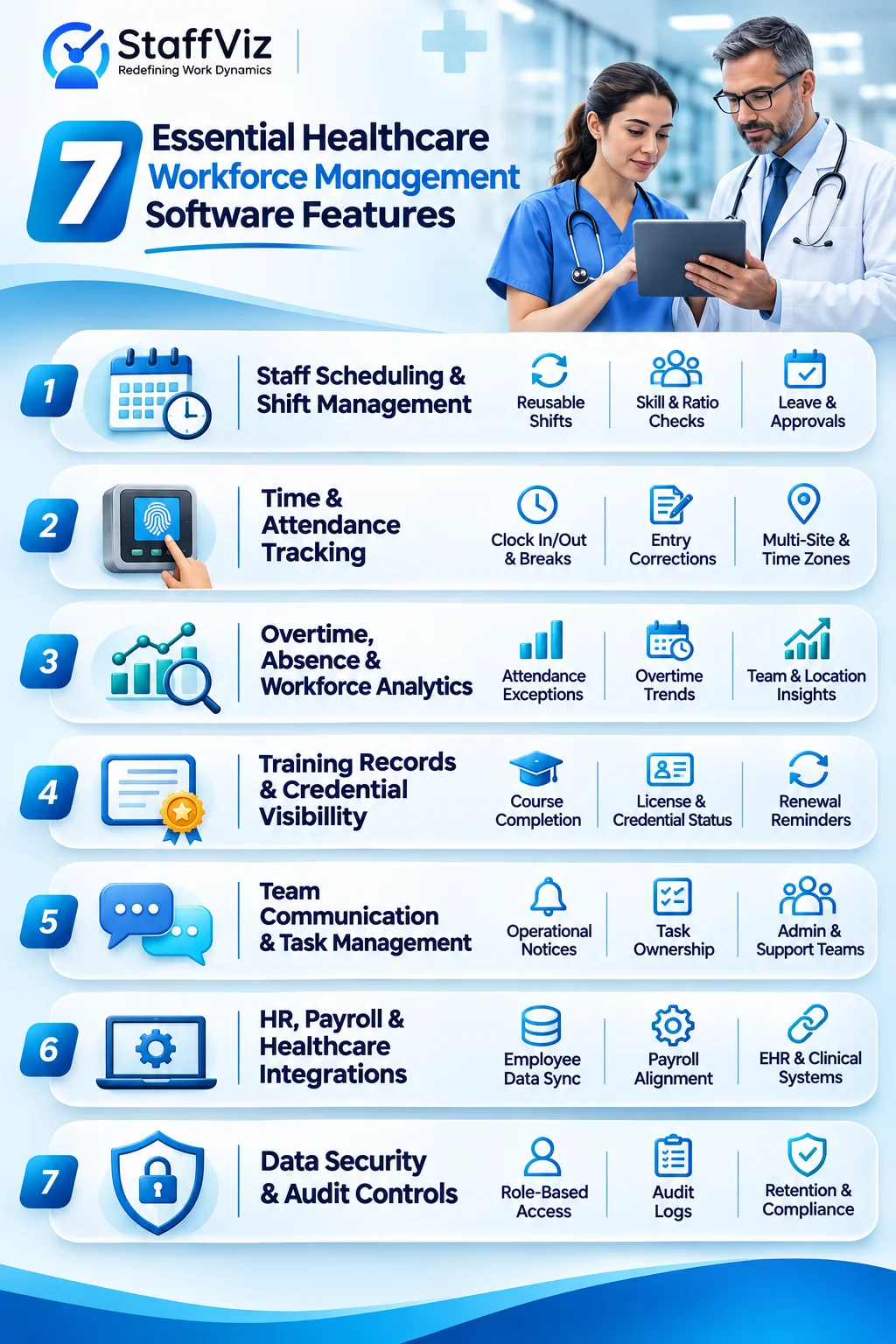
7 Essential Healthcare Workforce Management Software Features
When comparing platforms, use real daily scenarios rather than feature labels alone. These seven areas cover the most initial evaluations.
1. Healthcare Staff Scheduling and Shift Management
Look for reusable shifts, availability tracking, leave visibility, shift changes, and approvals. If you manage clinical schedules, ask whether the software actually checks out required skills, staff-to-patient ratios, and unit-specific rules. General shift scheduling is not the same as clinical rostering.
2. Healthcare Time and Attendance Tracking
Staff should be able to record start times, end times and breaks accurately, with a controlled way to correct missing entries. Managers need a review of history and consistent exports for payroll. For multi-site teams, test how the system handles different locations, schedules, and time zones.
3. Overtime, Absence and Workforce Analytics
Useful dashboards show attendance exceptions, overtime patterns, unfilled shifts where supported, and trends by team or location. Confirm how each metric is calculated. A report can reveal a recurring problem, but it cannot by itself prove the cause of burnout or solve a staffing shortage.
4. Employee Training Records and Credential Visibility
Training tools may track course completion and renewal reminders. Clinical credentials are different: verifying an active professional license or specialty qualification may require a dedicated system or an external check. Ask vendors to demonstrate the difference.
5. Healthcare Team Communication and Task Management
Operational notices, reminders and task ownership can reduce missed follow-ups for administration, reception, maintenance, and support staff. Do not use a general workforce messaging or monitoring feature to exchange patient information without an appropriate privacy and security assessment.
6. HR, Payroll and Healthcare Software Integrations
Check whether employee IDs, approved hours, absence codes and payroll adjustments move reliably between systems. Ask for API documentation or working examples of native connectors. If an EHR or clinical scheduling platform must be connected, request a specific integration plan instead of accepting a broad “integrates with everything” claim.
7. Healthcare Workforce Data Security and Audit Controls
Review role-based access, logging, retention settings, data location, support access, and incident handling. If protected health information (PHI) is involved in a US deployment, determine with legal and privacy teams whether HIPAA-related obligations and a business associate agreement apply. Do not treat a generic security claim as proof of compliance.
Benefits of Healthcare Workforce Management Software for Hospitals and Clinics
Reduce Overtime Visibility Gaps and Unexpected Staffing Costs
Earlier access to attendance and staffing data can help teams review gaps before they become urgent. Compare overtime hours per employee, attendance exceptions and agency costs before and after deployment; savings should be measured, not promised.
Save Time on Attendance and Workforce Administration
A consistent workflow can reduce duplicate timesheet entry, spreadsheet reconciliation, and repeated follow-ups. Measure how many manager hours are spent each month creating reports, correcting records, and preparing payroll inputs.
Identify Workload Patterns Without Oversimplifying Burnout
Repeated long shifts, unplanned absences, or frequent schedule changes can be useful signals for a conversation. They are not a diagnosis of burnout, and employee monitoring data should not be used as a substitute for clinical or human judgement.
Improve Accountability and Workforce Reporting
Visible approval of histories and consistent reporting help leaders explain how hours, leave and exceptions were handled. This supports internal review, but actual legal compliance still depends on local rules, correct configuration, and operational practice.
Healthcare Workforce Management Software vs Nurse Scheduling Software
These terms overlap, but they are not interchangeable. A hospital might need both a general workforce platform for time and attendance, and a specialist system for nurse scheduling.
If your top priority is qualification-based clinical coverage, test that workflow first. If the immediate issue is attendance, task coordination, or administrative reporting, a broader workforce platform may be a practical starting point.
How to Choose Workforce Management Software Solution for Healthcare
Use this buyer checklist to compare vendors against your actual staffing processes:
- Define the primary use case. Separate clinical rostering from HR administration, attendance, payroll preparation and support-team work.
- Document hard constraints. Capture rest periods, approvals, credentials, shift eligibility and the rules that vary by location.
- Test exceptions. Ask the vendor to demonstrate a forgotten clock-out, a backdated correction, a staff absence, and a post-approval shift change.
- Validate integrations. Follow an approved timesheet through payroll, checking field mapping, error handling, and reconciliation.
- Assess privacy and access. Inspect role permissions, logging, monitoring settings, data retention, and contractual safeguards.
- Include frontline staff in the demo. Observe whether employees can complete common tasks on the actual devices they use.
- Request an itemized quote and pilot. Include setup, training, support, add-ons, integration of work and exit costs, not just the monthly license.
How Much Does Healthcare Workforce Management Software Cost?
Pricing depends on the number of users, locations, selected modules, support level, and any integration or implementation of work. Some vendors charge per employee; others use tiers or tailored quotes. Payroll, training, monitoring and advanced reports may be separate cost items.
For a meaningful comparison, estimate first-year cost as: subscription fees + onboarding + integrations + training + paid add-ons + ongoing support. Ask for the same assumptions from each vendor, including how costs change when staff numbers rise or fall.
How StaffViz is Your All-in-One Workforce Management Software Solution for Healthcare
Running a healthcare facility is demanding enough without spending hours tracking attendance, coordinating shifts, or sorting through payroll records. When workforce information lives in different places, even routine decisions take longer than they should.
StaffViz brings essential workforce management functions into one platform, helping healthcare administrators stay organized, reduce manual work, and keep daily operations on track.
What Can StaffViz Do for Your Healthcare Team?
- Attendance Without the Paperwork: Keep employee attendance, working hours, and time records organized and accessible.
- Shifts That Are Easier to Manage: Schedule shifts and breaks, so managers have a clearer view of who is expected to work and when.
- Fewer Payroll Headaches: Turn organized time and attendance records into a smoother payroll management process.
- Tasks That Don't Get Lost: Assign responsibilities, follow progress, and keep administrative and support teams accountable.
- Better Oversight Across Locations: Monitor workforce activity across clinics and facilities without constantly switching between records.
- Workforce Insights You Can Act On: Use productivity reports to understand how teams spend their time and where operations could improve.

How to Implement Healthcare Workforce Management Software in 6 Steps
- Establish a baseline. Record the current process, attendance correction time, overtime, reporting effort, and main pain points.
- Select one pilot team. Start with a clinic administration group, support department or another limited workflow with a clear owner.
- Configure access and work rules. Set roles, shifts, approvals, exceptions and data-retention expectations before launching.
- Train staff on real tasks. Cover clock-in, timesheet correction, approvals, reports and contact support.
- Measure results against the baseline. Review accuracy, administrative effort, overtime visibility, adoption, and employee feedback.
- Expand only after validation. Resolve integration, privacy, and usability issues before introducing the system across more departments.
Frequently Asked Questions
What Is the Difference Between Nurse Scheduling Software and Workforce Management Software?
Nurse scheduling software focuses on rosters and clinical coverage. Workforce management software can cover a broader range of attendance, absence, reporting, and HR-related processes. The exact feature set depends on the product.
Can Healthcare Workforce Management Software Reduce Overtime?
It can help managers see overtime and attendance exceptions sooner, which may improve staffing decisions. Actual savings depend on staffing capacity, policies, and how teams use the information.
Does Healthcare Workforce Management Software Need to Be HIPAA Compliant?
That depends on the data handled and the organization's legal responsibilities. If the vendor processes protected health information for a US covered entity or business associate, relevant HIPAA requirements may apply. Seek appropriate privacy and legal assessment.
What Features Should a Small Clinic Look For?
Start with accurate attendance, leave visibility, straightforward approvals, reports, and payroll compatibility. Pay for specialized clinical scheduling only if it addresses a real operational requirement.
How Much Does Healthcare Workforce Management Software Cost?
There is no universal price. Compare the full cost of licenses, implementation, integrations, training, add-ons and support using the same number of employees and locations.
How Do You Measure a Successful Workforce Software Pilot?
Track attendance correction time, manager administration hours, overtime trends, data accuracy, employee adoption, and unresolved issues. Compare against the same measures collected before the pilot.
Effectively Manage Remote and Hybrid Teams with StaffViz
Enhance team efficiency and collaboration with StaffViz, the ultimate tool for managing remote and hybrid teams.
Talk To Us

Table of Content
- What Is Healthcare Workforce Management Software Solution?
- Why Healthcare Workforce Management Is More Complex
- 7 Essential Healthcare Workforce Management Software Features
- Benefits of Healthcare Workforce Management Software for Hospitals and Clinics
- Healthcare Workforce Management Software vs Nurse Scheduling Software
- How to Choose Workforce Management Software Solution for Healthcare
- How Much Does Healthcare Workforce Management Software Cost?
- How StaffViz is Your All-in-One Workforce Management Software Solution for Healthcare
- What Can StaffViz Do for Your Healthcare Team?
- How to Implement Healthcare Workforce Management Software in 6 Steps
- Frequently Asked Questions