Time Tracking for Medical Billing Companies: Know Where Your Hours Go

Eight hours logged. Three healthcare clients served. Do you know where the money went?
Your team may have spent the morning submitting claims, the afternoon chasing denied payments, and the last hour correcting billing errors. The timesheet says everyone worked a full shift. It says nothing about which client consumed the most time, which queue fell behind, or where repeated corrections ate into your margins.
That’s the problem with tracking attendance alone. Hours tell you how long people worked. They don’t tell you what that work cost your business.
Medical billing staff time tracking gives managers a clearer view of labor by client, task, and work queue. The trick is collecting useful information without burying your team in paperwork.

What Does Medical Billing Staff Time Tracking Actually Show?
Medical billing staff time tracking records how employees spend their working hours across client accounts and billing activities.
Three labels do most of the heavy lifting:
- Client: The healthcare organization receiving your billing services.
- Work queue: The group of outstanding work, such as denied claims or unpaid accounts.
- Task: The specific job being done, such as correcting a claim or posting a payment.
Say an employee spends 45 minutes resolving denials for Client A, then 30 minutes submitting claims for Client B. A daily total of eight hours won’t show that split. Properly categorized records will.
And there’s a distinction worth keeping straight: time tracking measures hours spent, while productivity tracking measures work completed and its quality. You need both before drawing conclusions about performance.
Why Should You Track Time by Client and Task?
A single total for the workday hides too much. Break those hours into useful categories, and you can start answering questions that affect staffing, service costs, and account performance.
1. Find out which accounts consume the most labor
Two clients may pay similar fees while demanding very different amounts of staff time.
Compare hours by account with revenue, service costs, and workload. If one client consistently requires more labor than expected, investigate before assuming the account is unprofitable. Complex claims, poor documentation, and frequent corrections may explain the difference.
2. Spot delays before the backlog grows
A queue full of old denials deserves attention. So does a rising number of claims sent back for correction.
Time records can help managers spot where work is accumulating. They won’t identify the cause by themselves, but they can point you toward a process, payer, or training issue worth investigating.
3. Assign work based on actual demand
One employee may be buried in denial follow-ups while another handles a steady stream of routine claims.
Look at hours, incoming volume, backlog, and task complexity together. That gives managers a better basis for shifting work, planning coverage, or deciding when additional training is needed.
4. Measure output without rewarding rushed work
Counting claims is easy. Judging the quality of those claims takes more care.
An employee handling complex denials may close fewer cases than someone processing routine claims. That doesn’t automatically make the first employee less productive.
Review completed work alongside accuracy, rework, and case complexity. Numbers need context.

Which Medical Billing Tasks Should You Track?
Start with the work your team performs regularly. Too many categories create busywork; too few leave managers guessing.
Track the activities that matter to your operation:
- Claims processing: Reviewing, correcting, and submitting medical claims.
- Payment posting: Recording payments, adjustments, and remittance details.
- Denial management: Investigating denials, correcting errors, and preparing appeals.
- Accounts receivable follow-ups: Chasing unpaid claims and outstanding balances.
- Eligibility and authorization: Checking coverage and authorization requirements.
- Rework and corrections: Recording time spent fixing errors or repeating tasks.
Medical billing companies can assign these categories to individual client accounts. Hospitals and clinics may find department-level or function-level categories more useful.
Keep the labels consistent. If one employee records “denials” and another records “claim appeals” for the same activity, your reports will need cleaning before they tell you much.
What Belongs in a Time Record?
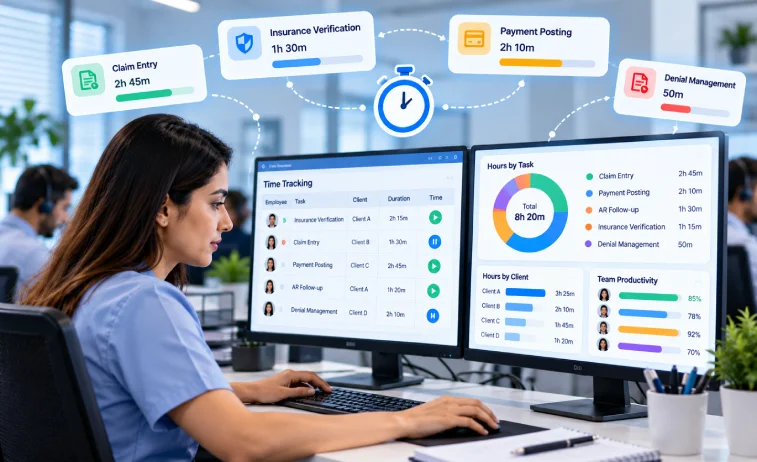
A time entry should answer a practical question: who worked, on what, for how long, and for which account?
Depending on your reporting needs, record:
- Employee and date
- Client or department
- Work queue or task category
- Time spent
- Work completed or current status
- Time spent correcting earlier work, where relevant
Don’t collect fields simply because a system allows them. Start with the information you need for cost reviews, workload planning, and performance analysis.
Where Medical Billing Time Tracking Goes Wrong
The idea sounds simple. The daily reality is messier.
Employees move between clients, switch applications, and handle cases that take very different amounts of effort. A tracking process that ignores those realities can produce tidy reports built on poor data.
Client time gets mixed together
An employee handles claims for four healthcare accounts during one shift. If the time entries don’t identify the right client, the labor report may assign costs to the wrong account.
Set a clear rule for changing client categories whenever the work changes. Make the rule easy to follow, especially during busy periods.
Work happens across several systems
A billing employee might use a practice management system, a clearinghouse, a spreadsheet, and several payer portals in one morning.
Don’t assume time tracking software can identify the client and task from computer activity alone. Check available integrations and decide how employees should record details the software cannot capture.
Timesheets get filled in from memory
When employees enter their hours at the end of a shift, small tasks can disappear from the record. Durations may be wrong, categories may be missing, and overlapping entries can slip through.
Set a clear entry routine. Review records regularly and ask about unusual entries instead of treating every discrepancy as evidence of poor performance.
Difficult cases look like slow work
A routine claim and a complicated denial aren’t equal units of work.
If managers compare completion times without accounting for complexity, they can penalize employees who handle the hardest cases. Include case type, accuracy, and rework in performance reviews wherever reliable data is available.
Employee monitoring captures too much
Medical billing work can involve patient details, insurance information, and payment records. More monitoring does not automatically produce better reporting.
Collect only the information your process needs. Review access permissions, retention settings, and the types of data a monitoring tool captures before rolling it out.
How to Track Medical Billing Staff Time Without Creating More Admin Work
A useful tracking process should fit the way your team already works. Start small, check the data, and fix the gaps before adding more rules.
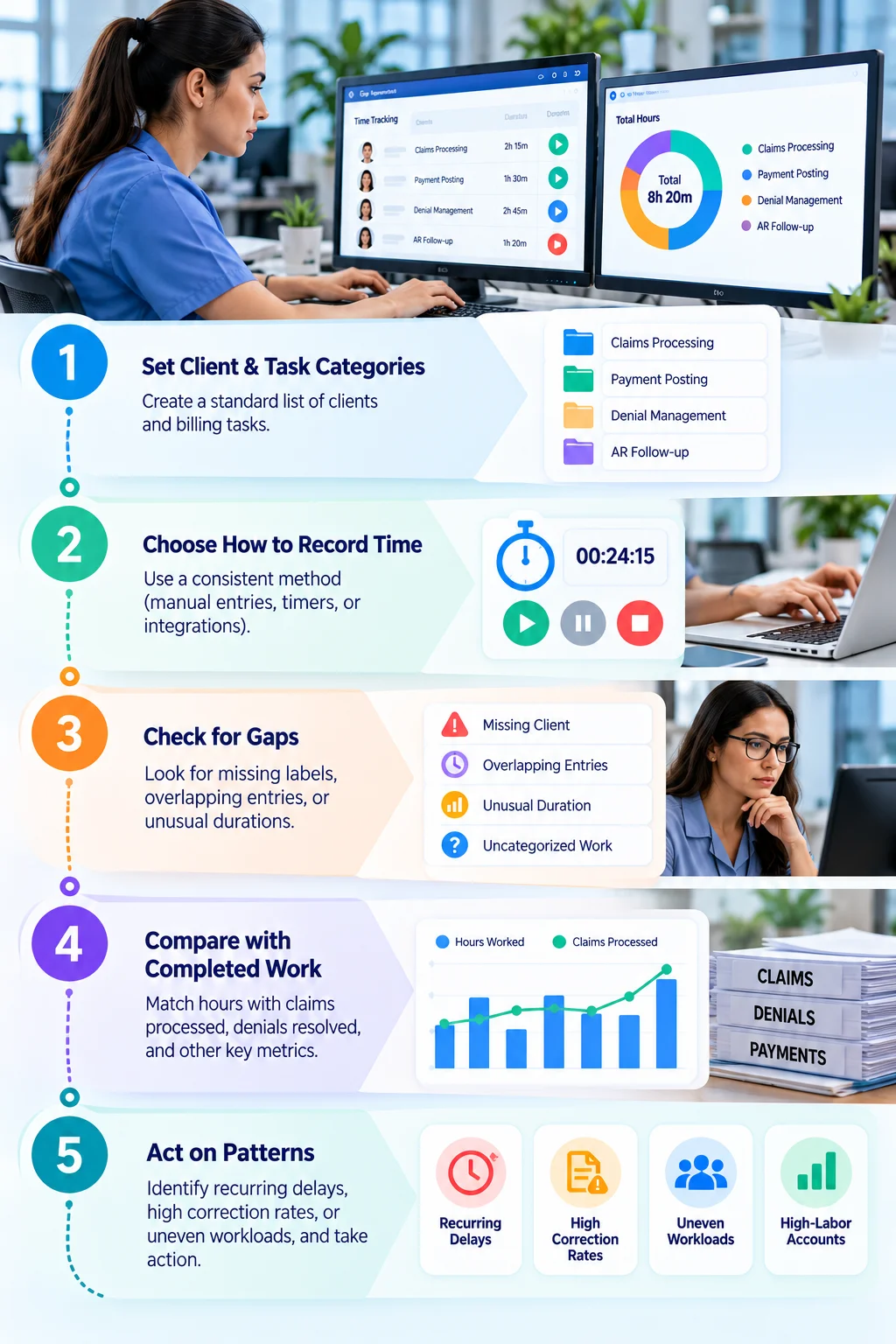
Step 1: Set your client and task categories
Create a standard list of client identifiers and billing activities. Include claims processing, payment posting, denial management, and accounts receivable follow-ups if those tasks are part of your operation.
Use the same labels across the team. Otherwise, comparing reports becomes a cleanup job.
Step 2: Decide how employees will record time
Choose a method your team can follow consistently, whether that means manual entries, timers, or another supported option.
Explain when to start and stop recording, how to handle interruptions, and what to do when an employee switches clients mid-task. Clear instructions matter more than a complicated set of rules.
Step 3: Check records for gaps
Look for missing client labels, overlapping entries, unusual durations, and uncategorized work.
Ask employees or supervisors to clarify discrepancies. A strange entry may reflect a genuine problem, but it may also reflect a difficult case or a recording mistake.
Step 4: Compare hours with completed work
Put time records beside claims processed, denials resolved, backlog changes, and quality measures.
A rise in hours might reflect poor workflow, or a sudden increase in incoming claims. The surrounding data helps you tell the difference.
Step 5: Act on recurring patterns
Look for repeated delays, high correction rates, uneven workloads, and accounts that require more labor than expected.
Investigate the cause before changing staffing levels or setting new performance targets. Time records show where to look; they rarely explain the whole story.
Which Metrics Help Measure Medical Billing Productivity?
No single metric can describe a billing team's performance. Use a small group of measures that reflect time, output, workload, and quality.
Don’t rank employees by claim count alone. A person resolving complicated denials may close fewer cases than a colleague handling routine submissions. The raw total misses the difference.
Use these metrics to spot problems, compare workloads fairly, and decide where a closer review is needed.
What Should You Check Before Buying Medical Billing Time-Tracking Software?
Not every workforce tracking tool is built for medical billing. Before choosing one, check whether it can produce the records your team actually needs.
Client-level reporting
Can you assign time to a client, department, or project and report on those categories? If the feature isn’t built in, check whether custom fields, integrations, or exported data can fill the gap.
Work queue and task categories
Can employees associate their time with the billing activity they’re performing? Don’t assume computer activity automatically identifies claim submissions, payment posting, or denial work.
Time entries and corrections
Check how employees record time, correct mistakes, and handle missing or overlapping entries. Managers also need a practical way to review questionable records.
Integrations and data exports
Check compatibility with your existing systems. If the tool cannot connect directly to your practice management system or clearinghouse, find out whether exported records can be reconciled with time data.
Reporting options
Confirm which reports and metrics the software provides. Some measures—such as claims processed, denial outcomes, and backlog aging, may need data from another system.
Privacy and access settings
Review what the software captures, who can see it, and how long records are retained. Make sure the setup fits your organization's privacy obligations and contractual requirements.
Can StaffViz Work for Medical Billing Teams?
StaffViz is a workforce analytics and employee monitoring platform that teams can assess for workforce time tracking. But there’s a difference between reviewing employee work activity and producing a reliable report of labor by client, work queue, and billing task.
Before adopting StaffViz Time Tracking Software for medical billing operations, verify that its current features meet your reporting needs. In particular, check out client-level allocation, task categories, relevant integrations, and the reports available to managers.
If a feature isn’t supported directly, establish whether another reliable method can supply the missing information. Don’t treat employee activity data as a substitute for billing output or claim-quality records.
Know Where Your Medical Billing Hours Go
Your team already spends hours. The question is whether your records show how those hours are distributed across clients, tasks, and outstanding work.
StaffViz can be assessed as part of your workforce tracking approach. Review its current time-tracking and reporting features against your team's requirements before deciding whether it fits.

Frequently Asked Questions
1. What is medical billing staff time tracking?
It records how employees spend working hours across billing tasks, client accounts, and work queues. Managers can use the data to review labor allocation and workload.
2. How do you track time across multiple clients?
Use consistent client and task categories for each time entry. Review records regularly for missing labels, incorrect durations, and unassigned work.
3. Which medical billing tasks should you track?
Common categories include claims processing, payment posting, denial management, accounts receivable follow-ups, eligibility checks, and claim corrections.
4. How does time tracking help manage labor costs?
It shows how staff hours are distributed across client accounts. Managers can compare that allocation with revenue, service costs, and workload to investigate unexpected expenses.
5. Which metrics help measure medical billing productivity?
Useful measures include hours by client, claims processed, denials resolved, rework rates, and backlog aging. Review these alongside claim accuracy and task complexity.
6. What makes medical billing time tracking difficult?
Employees may switch between clients, work across multiple systems, forget to record tasks, or handle cases with very different levels of complexity. Sensitive information also requires careful handling.
7. Can employee monitoring software track billing tasks automatically?
Not necessarily. Automatic client and task identification depends on the software's features, integrations, and configuration.
8. What should medical billing time-tracking software include?
Check for accurate time capture, client-level reporting, task categories, relevant integrations, data exports, and appropriate privacy controls.
9. How can teams improve time-tracking accuracy?
Use standard categories, explain when and how to record time, and review entries for missing or inconsistent information. Correct problems before relying on reports for staffing decisions.
10. Can StaffViz support medical billing time tracking?
StaffViz can be evaluated for workforce time tracking. Confirm that its current features meet your needs for client allocation, task reporting, and integrations before adopting it.
Effectively Manage Remote and Hybrid Teams with StaffViz
Enhance team efficiency and collaboration with StaffViz, the ultimate tool for managing remote and hybrid teams.
Talk To Us

Table of Content
- What Does Medical Billing Staff Time Tracking Actually Show?
- Why Should You Track Time by Client and Task?
- Which Medical Billing Tasks Should You Track?
- What Belongs in a Time Record?
- Where Medical Billing Time Tracking Goes Wrong
- How to Track Medical Billing Staff Time Without Creating More Admin Work
- Which Metrics Help Measure Medical Billing Productivity?
- What Should You Check Before Buying Medical Billing Time-Tracking Software?
- Can StaffViz Work for Medical Billing Teams?
- Know Where Your Medical Billing Hours Go
- Frequently Asked Questions